


Garmin Drive™
3.94.47K Reviews
App Specs
- Version
- 4.28.14
- Updated On
- License
- Free
- Downloads
- 1,000,000+
- Developer
- Garmin
- Categories
- Auto & Vehicles
- Platform
- Android, iOS
Screenshots
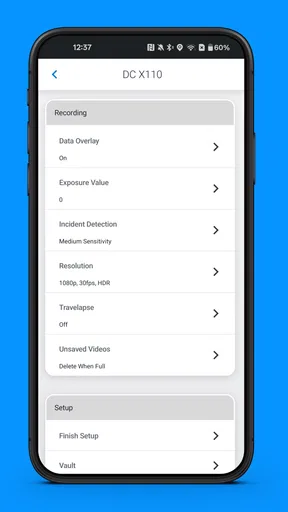
 Analysis by AppCompare
When I’m choosing a driving app, I care less about a long feature list than about whether it helps me make the next turn without adding stress. Garmin Drive™ is Garmin’s free Auto & Vehicles app, and its mix of navigation, alerts, and connected-device features makes it most appealing to drivers who already use Garmin products or want more than a basic route line on a phone screen.
Where it fits in a daily drive
I see Garmin Drive as a practical option for people who make regular trips on unfamiliar roads, commute through busy areas, or take weekend drives where a missed exit can cause a frustrating detour. It is not simply a map to glance at before leaving: route guidance, lane prompts, and road alerts are intended to help while the journey is underway. That focus is useful, but it also means the app is best judged in the context of how you drive and what devices you use alongside it.
For a familiar commute, I would not expect every extra to matter each day. The stronger case is a trip with several decisions close together: a highway interchange, changing traffic, and a destination in a busy part of town. In that situation, clear directions and timely prompts can take some mental load off the driver. I would still set the route before moving and rely on voice guidance rather than trying to work through menus at the wheel.
What the release history tells me
Garmin Drive was released on October 17, 2017, and its current version is 4.28.06. That gives the app a long-running presence rather than the feel of a newly launched experiment. It has a 3.9 average from around 23,000 ratings, with roughly 4,400 written reviews and over a million installs. Those figures suggest it has found an audience, while also reminding me that it is not a universal favorite.
A version number and a release date tell me that the product has continued to be maintained, but they do not by themselves prove that a particular feature has changed or that every device will behave the same way. For existing users, the sensible approach is to keep the app current and check how it works with the Garmin hardware they actually own. I would not update expecting a wholly different navigation experience; I would look for a stable continuation of the tools I already use.
Who is likely to get the most from it
The clearest fit is a driver who already owns compatible Garmin equipment and wants a phone app to sit within that setup. Garmin Drive is developed by Garmin, so the connection to the company’s devices is central to its appeal. If you use no Garmin products, it can still be worth considering as a navigation app, but the ecosystem advantage will matter less to you than the quality of the directions and alerts on your own routes.
It may be less suitable if you only need occasional point-to-point directions and already feel comfortable with the map app on your phone. Another navigation app may be a better choice if you strongly prefer its interface, have established routines around its saved places, or need particular offline-map tools. I would compare those everyday needs before switching rather than choosing on brand alone.
Worth Reading Before You Choose

Baby Panda World Brings Quick Play to Modern Phones, but Its Game Library Feels Busy

ESPN’s Live Game View Makes Following Close Games Easier

QuizzLand Review: A Good Fit for Short Trivia Breaks, Not Every Player

Basketball Stars: Multiplayer Is Fast, but Can It Recover When Matches Go Wrong?

WEBTOON Turns Phone Updates Into a Better Reading Routine

Link to Windows Runs on Shared Habits, Not Social Feeds
A realistic test is a weekday drive to an unfamiliar appointment. Before setting off, I would enter the destination while parked, connect the phone to the car if that is how I prefer to hear directions, and check that the chosen route makes sense. During the drive, I would pay attention to whether lane guidance arrives early enough to be useful and whether alerts are clear without being distracting. Afterward, I could decide whether the app’s extra guidance genuinely helped or whether a simpler map would have done the job just as well.
Garmin Drive is free and has an Everyone content rating. It runs on Android versions beginning with 9, so checking the operating system on an older phone is a straightforward first step before installing it. Those practical details make it accessible to a broad range of drivers, but compatibility with any separate Garmin device should still be considered on its own rather than assumed from the app’s name.
First Impressions and Interface
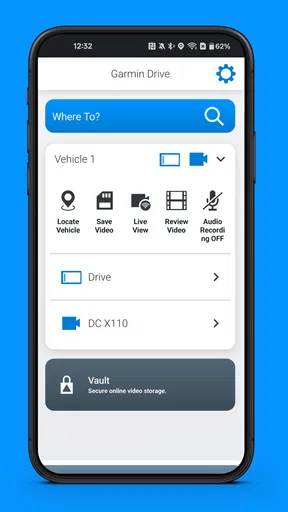
When I first launched Garmin Drive™, I was greeted with a clean and intuitive interface. It's not just about looking good; it's about making navigation straightforward and user-friendly. The home screen offers easy access to all the essential features, and after a few minutes of poking around, I felt like a pro.
The layout is designed to keep distractions to a minimum, which is crucial when you're behind the wheel. Buttons are large and easy to tap, even when you're in a hurry. I particularly appreciated the night mode, which automatically adjusts the screen's brightness to prevent glare during evening drives.
Navigation Features Galore
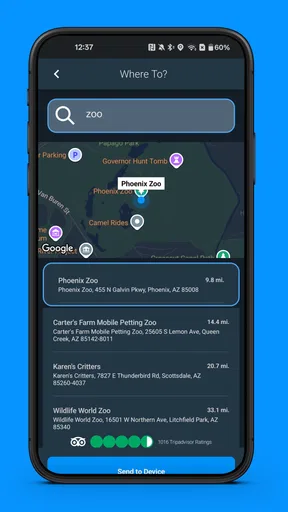
One of the standout features of Garmin Drive is its comprehensive route planning. It doesn’t just get you from point A to point B; it offers multiple routes, taking into account real-time traffic conditions. I tested it out during rush hour, and it successfully guided me through a less congested route, saving both time and frustration.
Another highlight is the lane guidance. It’s like having a co-pilot gently nudging you to stay in the correct lane, which is incredibly handy on busy highways or unfamiliar roads. No more last-minute lane changes or missed exits!
For a useful comparison, I would put this alongside familiar phone navigation apps rather than treat it as a replacement for every driving tool. A general-purpose map can be enough for a simple trip, while Garmin Drive’s lane prompts and driving alerts make more sense when the route involves complex junctions or when Garmin connectivity is part of your normal setup. I would choose based on the roads I travel most: a feature that helps on an unfamiliar interchange is valuable, but it should not be mistaken for a reason to change apps if my current option already handles my routine reliably.
Real-Time Alerts and Updates
Safety is paramount, and Garmin Drive seems to understand this. The app provides real-time alerts for upcoming sharp curves, speed changes, and even railroad crossings. This feature was surprisingly helpful, especially on roads I wasn’t familiar with. It also alerts you about red light cameras and speed traps, giving you that extra peace of mind.
The map updates are seamless, and I didn’t experience any lag or delay. Even when I intentionally took a wrong turn (for science!), the app quickly recalculated the route and got me back on track without a hitch.
My practical tip is to treat alerts as prompts for attention, not as permission to stop watching the road. Conditions can change, and no app can make a turn safe simply by announcing it. On routes I know well, I would also notice whether alerts add useful context or become background noise. That distinction matters: the same warning can be reassuring on a rural road I have never driven and unnecessary on a familiar street.
Integration and Connectivity
Garmin Drive isn’t just a standalone app; it integrates beautifully with other Garmin devices. If you’re already a Garmin user, you’ll love how it syncs with your smartwatch or fitness tracker. It’s like having your own little ecosystem of gadgets working harmoniously.
Connecting the app to my car’s Bluetooth was a breeze, allowing turn-by-turn directions to play through the vehicle's speakers. It’s these little conveniences that make a big difference during long drives.
For someone setting it up for the first time, I would test the audio before relying on it for a complicated drive. Start while parked, confirm that spoken directions come through the intended speaker, and make sure the phone’s usual media or call audio still behaves as expected. Bluetooth arrangements differ between cars, so a quick check can prevent the annoyance of discovering a sound-routing issue at the first junction.
There is a trade-off in choosing a connected app: the experience can be more useful when the phone and other devices cooperate, but that also gives you more than one place to troubleshoot if something feels off. If you do not own Garmin hardware, do not buy into the idea of an ecosystem just for its own sake. First decide whether the app’s navigation and alerts suit your needs on their own.
Extra Features Worth Mentioning
For those who love a little more than just navigation, Garmin Drive offers some neat extras. The driver score feature was an eye-opener for me. It analyzes your driving habits and provides feedback to help you drive more efficiently. Who knew I could improve on my already stellar driving skills?
There’s also a live parking feature that shows available parking spots in real-time. It saved me from circling the block multiple times during a busy Saturday afternoon in the city. A true lifesaver!
I would use these extras selectively rather than make them the reason to install the app. A driver score is most useful as a gentle way to notice habits and reflect on them; it is not a complete assessment of every choice a driver makes. Likewise, live parking is most relevant when I am heading somewhere crowded and need help narrowing down options. I would still keep a backup plan for parking, since availability can change between checking a spot and arriving there.
These tools also point to a useful way to evaluate the app over time: ask whether each one changes a real decision. If route guidance helps with a regular difficult turn, keep it in the routine. If a score or parking prompt does not affect how I drive or plan, I can simply ignore it rather than letting extra screens make the experience busier than necessary.
What to keep in mind as you use it
The most important limitation is that a navigation app is only as helpful as its fit with the driver’s habits, phone, and car. Garmin Drive’s combination of route options, traffic information, alerts, and connected features can be more than a casual user needs. If I were choosing an app for someone who wants only a simple map and occasional directions, I would encourage them to compare it with the navigation app they already know before changing routines.
I would also avoid making a long, time-sensitive trip the first test. Try it on a familiar journey while parked before departure, then notice whether the route choices and audio work as expected. That small trial answers the practical questions that a feature list cannot: whether the interface makes sense to you, whether prompts are easy to follow, and whether the app complements your car rather than competing with its existing audio setup.
The Verdict
After spending some quality time with Garmin Drive, I can confidently say it’s a solid choice for anyone in need of a reliable navigation app. It’s packed with useful features that enhance the driving experience without overwhelming the user. The app’s ability to provide real-time updates, seamless integration, and thoughtful extras makes it worth a try.
Whether you're a tech-savvy driver or someone who just wants to get from point A to B without a fuss, Garmin Drive is a trusty co-pilot ready to guide you along the way. So, if you’re in the market for a new navigation app, give it a whirl. You might just find yourself enjoying the journey as much as the destination.
My bottom line for different drivers
I would recommend giving it a fair trial if you drive unfamiliar routes often, value lane guidance and alerts, or already use Garmin devices. I would be more cautious if you have a navigation setup you already trust and only want the most basic directions. In that case, the extra tools may not justify learning a different interface.
For me, the best reason to keep Garmin Drive is not that it promises to make every journey effortless. It is that its practical driving prompts can help me feel more prepared when a route gets complicated, while its connected features offer extra value to people already in Garmin’s world. That makes it a worthwhile option, with a clear caveat: try it on your own roads and judge it by whether it genuinely makes your driving calmer and clearer.
Pros
- User-friendly interface with intuitive navigation.
- Real-time traffic updates improve route planning.
- Customizable notifications for alerts and reminders.
- Offline maps available for use without data.
- Seamless integration with Garmin devices.
Cons
- Limited compatibility with non-Garmin devices.
- Requires frequent app updates for optimal use.
- Voice commands can be inconsistent at times.
- Battery consumption is relatively high during use.
- Some features require premium subscription.
FAQs for Garmin Drive™
What features does Garmin Drive™ offer for navigation?
Garmin Drive™ offers a range of features to enhance your navigation experience, including real-time traffic updates, lane guidance, and point-of-interest information. It also provides speed limit alerts and live parking data. The app is designed to make driving safer and more efficient with its intuitive interface and reliable GPS accuracy.
Is Garmin Drive™ compatible with all smartphones and vehicles?
Garmin Drive™ is compatible with both Android and iOS devices, but it's important to check the specific system requirements for your phone’s operating system version. Regarding vehicles, it works with most Bluetooth-enabled cars, though some features may vary based on your vehicle's specifications.
Does Garmin Drive™ require a constant internet connection?
Garmin Drive™ primarily uses GPS for navigation, which does not require an internet connection. However, features like real-time traffic updates and live parking information do need a data connection to function. It’s advisable to have a mobile data plan to utilize all features fully.
Are there any subscription fees or in-app purchases in Garmin Drive™?
Garmin Drive™ itself is free to download, but it may offer in-app purchases for additional features or premium services. Always check the app store listing for any subscription details to understand what additional costs might be involved before downloading.
How user-friendly is Garmin Drive™ for new users?
Garmin Drive™ is designed with a user-friendly interface that is intuitive for both new and experienced users. It offers clear instructions and easy-to-navigate menus, making it straightforward to set up and use. The app also provides helpful tutorials and customer support for any issues.


